Skip to content

Gaiji & Kanji Edit Kits

GAIJI TOOLS

GAIJI TOOLS let DTP users create gaiji for any PostScript typeface and embed them in PDF, and succeeded Gaiji Edit Kit in 2000.

At a glance

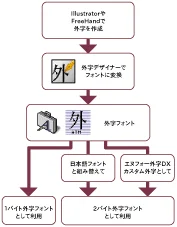
GAIJI TOOLS is Enfour’s gaiji creation package for DTP and PDF work, released in August 2000 as the successor to Gaiji Edit Kit. It creates gaiji fonts for any PostScript typeface, including custom gaiji for the Enfour Gaiji DX Series, and supports embedding them in PDF. Registered users could also download ready-made characters from the Gaiji and CID Variant Switching download services.

Key facts

ReleasedAugust 2000 (successor to Gaiji Edit Kit)
Works withAny PostScript font; Enfour Gaiji DX
PDFGaiji embeddable in PDF
ServicesGaiji Download Service, CID Variant Switching Download Service
StatusHistorical product
GAIJI TOOLS: flow (original Enfour artwork)
Part of

Enfour’s font-creation tools: Kanji Edit Kit, GAIJI TOOLS, and the Gaiji Edit Kit family for making original Japanese fonts and gaiji.

Historical product information from Enfour’s original Japanese font site, translated into English. Prices, addresses, and ordering details from the period are omitted.

Details

From the original product pages

GAIJI TOOLS

GAIJI TOOLS title

Your passport to gaiji expertise

Master gaiji with “GAIJI TOOLS”!

GAIJI TOOLS: flow (original Enfour artwork)

Ideal if gaiji give you trouble in DTP work or when embedding fonts in PDF, or if you want to make gaiji but think it looks difficult. Create gaiji fonts from files made in drawing tools you already know, such as Illustrator and FreeHand. Handy tools that support everything from using gaiji fonts to printing them, in one package. Master gaiji techniques that work everywhere.
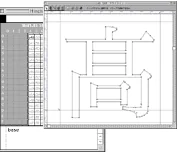
Gaiji fonts for every situation, from DTP to PDF

  • Single-byte gaiji fonts: Create gaiji in Western font format, with gaiji assigned in place of alphabet letters. Easy to handle, and can be embedded in PDF.
  • Double-byte gaiji fonts (recomposite fonts): Working with Adobe Type Composer (ATC), create double-byte gaiji fonts that behave like ordinary Japanese fonts — input from your input method, vertical writing, and PDF embedding are all supported.
  • Custom gaiji for Gaiji DX: Create custom gaiji that add characters to Enfour Gaiji DX.

A set of tools packed with gaiji creation, input, and output know-how

  • Gaiji Designer: A gaiji creation tool that generates single-byte gaiji fonts, double-byte gaiji fonts (gaiji fonts for ATC) and custom gaiji for Enfour Gaiji DX. Simple character design is also possible.

GAIJI TOOLS: gd (original Enfour artwork) – Adobe Type Composer 1.2: A font utility that creates recomposite fonts by adding gaiji to your ATM or PostScript fonts. – UniDict Lite for Kanji: Click a radical in the radical search palette to quickly find kanji similar to the gaiji you want to make.
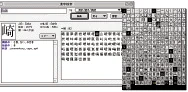
GAIJI TOOLS: ulk (original Enfour artwork) – CID Glyph Switching Table: Lists the characters switched by glyph-switching features, so you can check the easily overlooked variants contained in CID fonts.
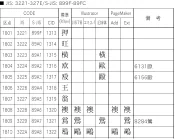
GAIJI TOOLS: jikiri (original Enfour artwork) – Gaiji Design Sheet: A template that lets even first-timers start designing gaiji straight away.
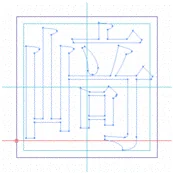
GAIJI TOOLS: gds (original Enfour artwork) – ART2EPS1: Converts Illustrator data into gaiji files for Gaiji Designer. – Gaiji Search Palette: Displays gaiji and enters them easily into DTP software by drag and drop.
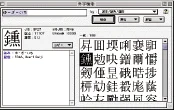
GAIJI TOOLS: gkensaku (original Enfour artwork) – Output tools: Download gaiji fonts to PostScript printers and high-resolution imagesetters.

Contents

CD-ROM, manual, user registration postcard

Requirements

  • A Macintosh that can run KanjiTalk 7.6.1 to Mac OS 9.2.2
  • Adobe Type Manager 3.9.1 or later (ATM 4.5.2 or later on Mac OS 9)
  • CD-ROM drive
  • About 22 MB of free disk space for all data
  • 8 MB or more free memory

Notes

  • All rights not otherwise stated are owned by Enfour.
  • Macintosh, KanjiTalk, Mac OS, and Mac OS X are registered trademarks or trademarks of Apple Computer, Inc.
  • Adobe, Adobe Illustrator, Adobe Type Composer (ATC), and PostScript are trademarks of Adobe Systems Incorporated.
  • Macromedia and FreeHand are registered trademarks of Macromedia, Inc.
  • All other registered trademarks and trademarks belong to their respective companies.
  • If you wish to sell or distribute data created with this product, please contact us.
  • Gaiji Designer cannot create double-byte (composite) fonts.
  • Depending on the printer or RIP, recomposite fonts may not work. Some PostScript fonts also do not support recomposite fonts.
  • With Kotoeri 2.0, gaiji are entered from the Gaiji Search Palette.
  • Product specifications and prices are subject to change without notice.

GAIJI TOOLS Q&A

GAIJI TOOLS Q&A

GAIJI TOOLS title

Q&A

  • Which fonts are supported?
  • How is it different from Gaiji Edit Kit?
  • Can I build gaiji by combining parts?
  • Which font formats are supported?
  • Can I print on PostScript printers and RIPs?
  • What is ATC?
  • Can I create double-byte fonts?

Does it support any typeface? You can create gaiji for any typeface, as long as it is a PostScript font. You can also create custom gaiji for the Enfour Gaiji DX Series.

How is it different from Gaiji Edit Kit? The core is the same, but GAIJI TOOLS adds a range of tools that support gaiji creation.

Can I create gaiji by combining parts? Relying on parts would limit the typefaces you can create gaiji for, so outlines are drawn in graphics software DTP users already know, such as Adobe Illustrator. We believe this is more efficient than mastering each font vendor’s own gaiji application. “UniDict Lite for Kanji” is bundled so you can check parts.

Which font formats are supported? PostScript fonts in general (ATM fonts, high-resolution printer fonts, and low-to-mid-resolution printer fonts). For TrueType, only the Enfour Gaiji DX TrueType Edition 2-Typeface Pack (Enfour Gaiji Mincho L, based on Ryumin Light-KL, and Enfour Gaiji Gothic M, based on Chu Gothic BBB) is supported.

Can I print on PostScript printers and RIPs? Provided the base font is installed on the printer or RIP, there is no problem with standard genuine Adobe PostScript printers and RIPs. Some PostScript-compatible printers and RIPs cannot be used; please ask their manufacturers.

What is ATC? Adobe Type Composer, an Adobe font utility that creates recomposite fonts by adding gaiji to ATM and PostScript fonts. It comes with GAIJI TOOLS.

Can I create double-byte fonts? Using the recomposite-font mechanism, single-byte gaiji fonts you create can be used as part of a double-byte font, but a complete double-byte font cannot be created. To create double-byte fonts, please get Kanji Edit Kit, which creates Japanese TrueType fonts. For creating Japanese PostScript fonts, please contact us.

I have another question.

GAIJI TOOLS Announced

Your passport to gaiji expertise — master gaiji with this!

“GAIJI TOOLS” announced

July 24, 2000 For various reasons, the release date of GAIJI TOOLS has been changed to August 10. We sincerely apologize to customers, retailers, and partners who have been looking forward to the release.

July 6, 2000 Enfour Media Laboratory today announced that from August 5, 2000 it will sell GAIJI TOOLS, the easiest gaiji solution package for DTP users.

Features

GAIJI TOOLS is a gaiji solution package for Macintosh for anyone who struggles with gaiji in DTP work, wants to embed gaiji in PDF, or wants to make gaiji but finds Fontographer difficult. At its core is Gaiji Designer, which converts Illustrator and FreeHand files into ATM and PostScript gaiji fonts, together with tools that make gaiji characters easy to handle.

Gaiji font creation for every situation – Single-byte gaiji fonts: gaiji assigned to keyboard keys. Easy to handle; can be embedded in PDF. – Double-byte gaiji fonts: gaiji that also work in vertical text. Register words in your input method to type them, or search and enter them with the Gaiji Search Palette. Can be embedded in PDF. – Custom gaiji for Gaiji DX: custom gaiji for the Gaiji DX Series.

Gaiji creation, input, and output know-how in one package – Outline creation support: in “UniDict Lite for Kanji”, click a radical (hen/tsukuri) to see parts from every typeface that help in creating gaiji. The “CID Glyph Switching Table” lists the characters switched by the glyph-switching features of Illustrator and FreeHand, so you can check the easily overlooked variants contained in CID fonts. – Gaiji input tool: the Gaiji Search Palette displays gaiji and lets you enter them in DTP software by drag and drop or copy and paste. – Gaiji output tools: various output tools for embedding and recompositing gaiji fonts and downloading them to printers and output devices.


Message from Richard GAIJI TOOLS goes beyond the category of “gaiji creation software” to be “gaiji font creation software” — a “gaiji solution package”. However advanced its editing features, a tool means nothing if you cannot create gaiji fonts for the typefaces you need and actually use (output) them. GAIJI TOOLS can create gaiji fonts without limiting you to particular typefaces.


Contents

CD-ROM, manual, user registration postcard

Requirements

  • A Macintosh that can run KanjiTalk 7.6.1 or later
  • Adobe Type Manager 3.9.1 or later (ATM 4.5.2 or later on Mac OS 9)
  • CD-ROM drive
  • About 12 MB of free disk space for all data
  • 8 MB or more free memory

Contact

Enfour Media Laboratory, Ltd. (http://www.enfour.co.jp/media/)

GAIJI TOOLS — Special Offer for Existing Users

GAIJI TOOLS title

Special offer for existing users

Dear users,

Thank you for your continued use of Enfour Media Laboratory products.

To apply, download and print this application form (PDF, 96 KB).

We look forward to your continued use of Enfour Media Laboratory products.

For an overview of GAIJI TOOLS, see here.

Special prices

|—|—|

Offer period

August 1, 2000 to the end of February 2001. Shipping begins August 25, 2000. After that, orders ship about one week after the application is confirmed.

Bonuses

  • Gaiji DX Series users who buy GAIJI TOOLS get the Gaiji Download Service currently offered to Gaiji DX i Edition users.

User Only

Pages for registered users only

GAIJI TOOLS: gaijitools logo (original Enfour artwork)

GAIJI TOOLS users can access GAIJI TOOLS Online, which offers tips on getting the most out of GAIJI TOOLS, general gaiji tips, and other information useful for DTP work. You can also register for the Gaiji Download Service there.

To access it, open “About Online Support.html” in the “Online Support” folder inside the “GAIJI TOOLS 1.0” folder with Netscape Navigator or Internet Explorer, then click [Connect to Online Support].

Gaiji DX i Edition

GAIJI TOOLS: ie image (original Enfour artwork)

Enfour Gaiji DX i Edition users: open “Gaiji Registration Guide.html” in the “Gaiji Editor” folder inside the “Special Extras” folder with Netscape Navigator or Internet Explorer, then click “Gaiji Creation Service” at the lower right of the screen. Clicking “Gaiji Download Service” takes you to the registration screen for the Gaiji Download Service.
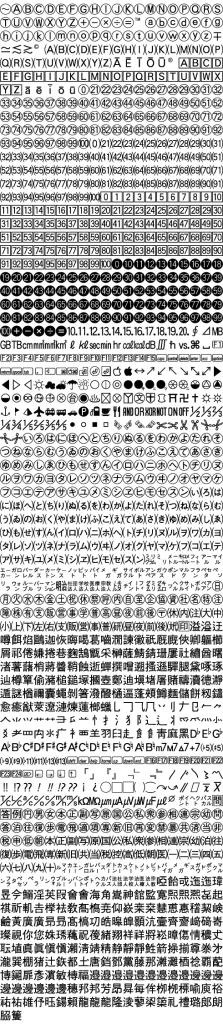
Related typography

Explore related products

Technical & Support Archive

Archive of Enfour’s CID Variant Switching Download Service for TypeBank and GAIJI TOOLS users, merged into one radical index table.

Technical & Support Archive

Archive of Enfour’s Gaiji Download Service for Gaiji DX and GAIJI TOOLS users: radical index, character lists, and Weekly Gaiji Download issues.

Enfour Gaiji DX Series: gaijimozi (original Enfour artwork)
Enfour Gaiji DX

Enfour Gaiji DX (1998) added about 1,500 gaiji to Mac OS and Morisawa DTP fonts, in i, TrueType, ATM, and PS editions plus option packs.