Enfour Gaiji DX
Enfour Gaiji DX Series
Enfour Gaiji DX (1998) added about 1,500 gaiji to Mac OS and Morisawa DTP fonts, in i, TrueType, ATM, and PS editions plus option packs.



Enfour Gaiji DX Series

Ever come across characters you can’t type on a Macintosh?
Circled numbers above 20, certain symbols, or the characters you need for personal and place names… Enfour Gaiji DX collects the characters that could not be typed on a Macintosh and lets you display and print them just like ordinary characters.
What is Enfour Gaiji DX?
A gaiji package for Macintosh that, with a simple installation, gives you about 1,500 gaiji characters.
For home and business use, i Edition and the TrueType Edition are the best fit; for DTP, the ATM and PS Editions are the most convenient. If you have a PostScript printer, we recommend the PS Edition.
There are 2-typeface packs designed to match Hoso Mincho and Chu Gothic, and 3-typeface packs designed to match Futo Min, Futo Go, and Jun (3-typeface packs are ATM and PS Editions only).
Register the included dictionaries and you can type gaiji with the latest input methods, such as Kotoeri 2.0.
Combine with the option packs (sold separately) to enter medical and dental terminology characters and to use IBM extended characters.
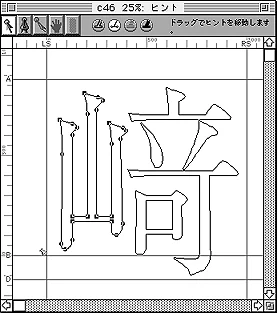
With Gaiji Edit Kit (sold separately) you can create and register original gaiji. Gaiji Edit Kit was discontinued in August 2000; its successor is GAIJI TOOLS.
With GAIJI TOOLS (sold separately) you can create and register original gaiji.
The Enfour Gaiji DX Series line-up
- Enfour Gaiji DX i Edition
- Enfour Gaiji DX TrueType Edition 2-Typeface Pack
- Enfour Gaiji DX ATM Edition 2-Typeface Pack / 3-Typeface Pack
- Enfour Gaiji DX PS Edition 2-Typeface Pack / 3-Typeface Pack (with ATM Edition)
Option pack line-up
- Option Pack Medical / Option Pack Dental / Option Pack IBM
Enfour Gaiji DX trial version
- Enfour Gaiji DX trial version
i Edition
Use Enfour gaiji based on the TrueType fonts Ryumin Light-KL and Chu Gothic BBB that come with Mac OS. Ideal for word processing, spreadsheets, databases, and New Year’s card software at home or in the office.
About 1,900 gaiji are available (including the 388 characters of Option Pack IBM). An original gaiji creation tool and a gaiji input tool come as standard. You can also search the Gaiji Download Service and download the gaiji you need.

TrueType Edition 2-Typeface Pack
Choose this if you want to use the Enfour Gaiji DX Option Pack Medical or Option Pack Dental with TrueType.
To users of, and anyone considering, Enfour Gaiji DX TrueType Edition and i Edition
Enfour Gaiji DX TrueType Edition and i Edition require the TrueType fonts Ryumin Light-KL and Chu Gothic BBB that come with Mac OS.
They have been confirmed to work on Mac OS 9.0.4, but Ryumin Light-KL and Chu Gothic BBB are no longer bundled with Mac OS from 9.0.4. Please check your Mac OS CD-ROM before buying.
For licensing details of Ryumin Light-KL and Chu Gothic BBB, please contact Apple Computer.
ATM Edition
- 2-Typeface Pack: Use Enfour gaiji based on the ATM fonts L Ryumin L-KL and M Chu Gothic BBB (required separately). Built on standard DTP fonts — ideal for professional graphics and page-layout software. Apple standard system gaiji (characters added from KanjiTalk 7) also become available.
- 3-Typeface Pack: Use Enfour gaiji based on the ATM fonts Futo Min, Futo Go, and Jun (required separately). Apple standard system gaiji also become available.
For either pack, if you have a PostScript printer we recommend the PS Edition.
PS Edition
- 2-Typeface Pack: Ideal if you use a PostScript printer with L Ryumin L-KL and M Chu Gothic BBB. The ATM Edition is included, covering DTP from production to output. No resolution limit. Requires a printer hard disk.
- 3-Typeface Pack: Ideal if you use a PostScript printer with Futo Min, Futo Go, and Jun. No resolution limit. Requires a printer hard disk.
Supports both OCF and CID. Please ask about software RIPs and PS-compatible printers. Can coexist with other companies’ products.
Option packs
Installed in addition to one of the 2-typeface packs; cannot be used on their own.


- Option Pack Medical: 188 characters — kanji used in disease names and symbols for insurance records. Includes a specialised medical dictionary.
- Option Pack Dental: 321 characters — dental notation symbols and symbols for insurance records. Includes a specialised medical dictionary.
- Option Pack IBM: Displays IBM extended characters on the Macintosh. 388 IBM characters.
Trial version
The Enfour Gaiji DX trial version consists of the bitmap font data included with the full product and the dictionaries for each input method (kana-kanji conversion program), so you can experience exactly how Enfour Gaiji DX input works in the same environment as the full product.
The trial version displays and prints with bitmaps. For outline display and printing, please buy the full product. All the support files below are also included.
Download the Gaiji DX trial version (725 KB)
Support information
Support files for Mac OS 8.5 and later
Check the table below and download the support files for your environment.
| Input method | Kotoeri (8.5) | ATOK11 | ATOK12–14 |
|---|---|---|---|
| Gaiji dictionary | Included with the Gaiji DX package | Included with the Gaiji DX package | Download from the web |
| Candidate display | Gaiji appear as □. Set Enfour Gaiji with the font selector to the right of the conversion bar; candidates remain □. See here for details. | (as Kotoeri) | Download Enfour Gaiji DX IM Display (116 KB), install it in the Fonts folder and set it as the candidate font. Both the conversion bar and candidates then display correctly. |
| Vertical-writing characters | Download and install Marukan Compatible Vertical Writing Support (12 KB); vertical characters then display correctly. |
Support files for Morisawa NewCID fonts
- For Gaiji DX ATM Edition (PS Edition) 2-Typeface Pack (92 KB)
- For Gaiji DX ATM Edition (PS Edition) 3-Typeface Pack (138 KB)
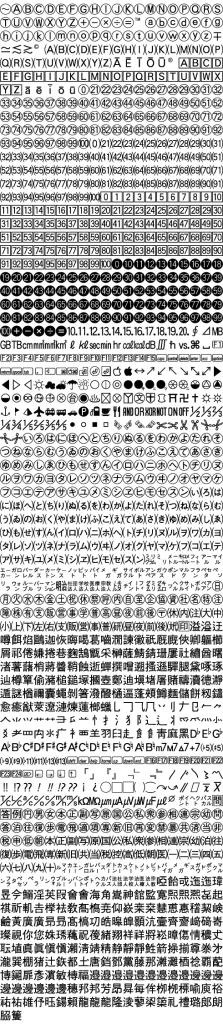
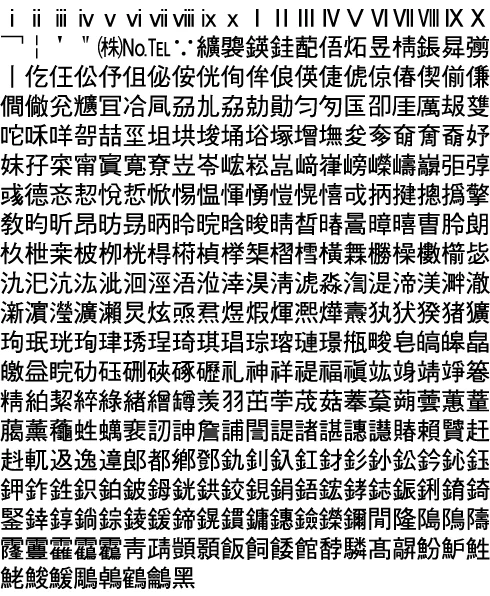
Enfour Gaiji DX Character Set
Enfour Gaiji DX Character Set
This gaiji set is common to the 2-typeface pack and the 3-typeface pack. The sample is set in Enfour Gaiji Gothic M.
Apple standard system gaiji: 2 characters added to JIS Level 2
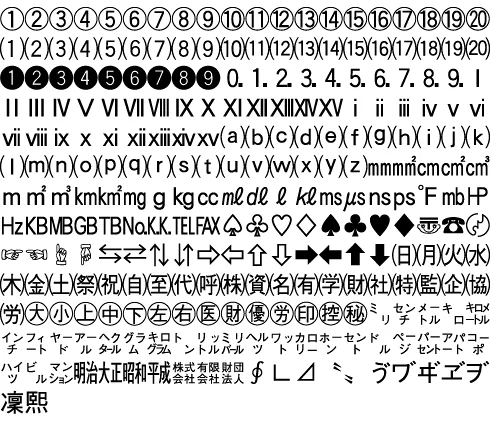
Enfour Gaiji DX: 1,504 characters (Shift_JIS code range $F040–$F7FC)
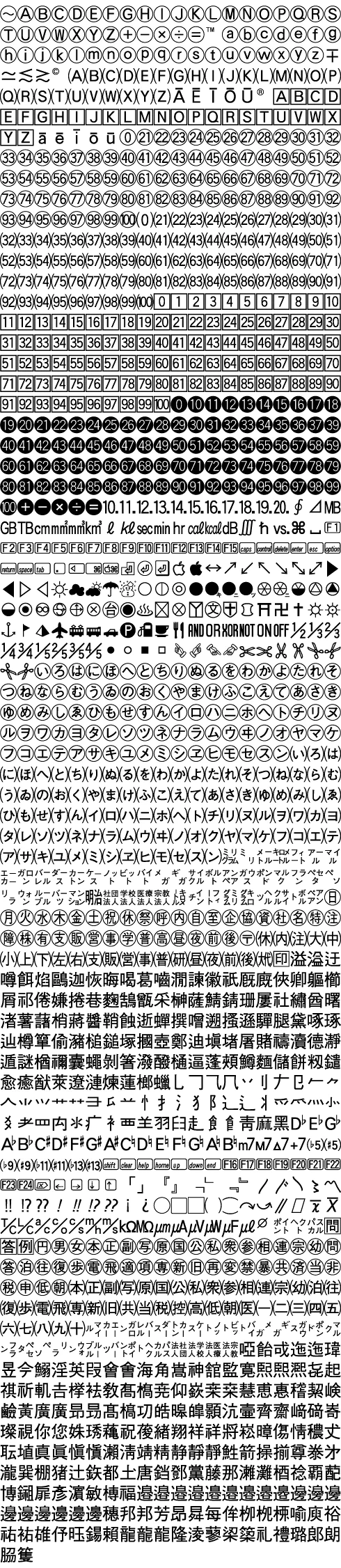
Adds about 1,500 gaiji characters, centred on punctuation, symbols, and traditional kanji forms used in personal names.