Gaiji & Kanji Edit Kits
Gaiji and Kanji Edit Kits
Enfour's font-creation tools, from the 1992 PS Gaiji Kit to Kanji Edit Kit 2.5 and GAIJI TOOLS, let designers build Japanese fonts and gaiji.
At a glance
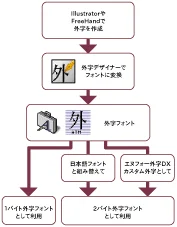
Enfour built some of the first tools for creating Japanese fonts and gaiji on the Macintosh. The line began with the PS Gaiji Kit in 1992 and the TT and ATM Gaiji Kits, the ATM kit being the world’s first CID font product in 1994. It continued with Gaiji Edit Kit, Incubator, and Marukan Editor, GAIJI TOOLS for PostScript gaiji, and Kanji Edit Kit, which turned Fontographer or Illustrator outlines into full Japanese TrueType fonts for Mac OS and Windows.
Key facts
| First product | PS Gaiji Kit (November 1992) |
|---|---|
| World first | ATM Gaiji Kit (1994), the first CID font product |
| Key tools | Kanji Edit Kit 2.5, GAIJI TOOLS, Gaiji Edit Kit, Incubator, Marukan Editor |
| Output | Japanese TrueType (Mac and Windows), PostScript gaiji |
| Status | Historical products |

Part of
Every Enfour product line in one place: gaiji fonts, edit kits, TypeBank, kana, Comic-Font, screen fonts, FONT1000, and the support archive.
Historical product information from Enfour’s original Japanese font site, translated into English. Prices, addresses, and ordering details from the period are omitted.
In this product line
Gaiji and Kanji Edit Kits: products and resources

Gaiji & Kanji Edit Kits
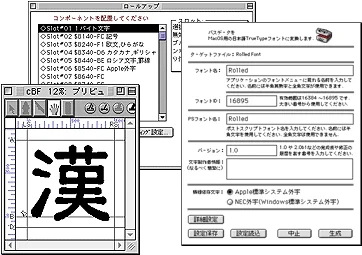
Kanji Edit Kit 2.5 turned Fontographer fonts or Illustrator outlines into 2-byte Japanese TrueType fonts for Mac OS and Windows.

Gaiji & Kanji Edit Kits
GAIJI TOOLS let DTP users create gaiji for any PostScript typeface and embed them in PDF, and succeeded Gaiji Edit Kit in 2000.

Gaiji & Kanji Edit Kits
A showcase of Japanese typefaces built with Enfour’s Kanji Edit Kit, from ZEN Old Mincho to seal-script and brush fonts by independent makers.

Gaiji & Kanji Edit Kits
Enfour’s ‘We Turn Your Handwriting into a Font’ service made Japanese TrueType fonts from customers’ own handwriting.
Details
Background
Gaiji Creation Tools and More
Gaiji Edit Kit · Incubator · Marukan Editor
Gaiji Edit Kit 1.2J
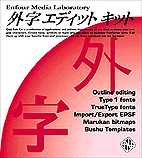
A tool for creating gaiji fonts for the Enfour Gaiji Kit, or gaiji fonts for Adobe Systems’ Adobe Type Composer.
It includes “Gaiji Designer” for creating outline gaiji, “GaijiEditor” for creating bitmap gaiji, and template files that help with gaiji creation.
Gaiji Designer
Gaiji Designer is an outline font editor dedicated to creating gaiji. – Generates PostScript Type 1 and TrueType fonts – Templates let even beginners create gaiji fonts easily – Edit outlines (Bézier curves) just as in Illustrator – Automatically generates bitmap data from outline information – Automatically places TIFF and PICT data as a tracing template – Imports and exports Illustrator 1.1 EPS files
The Gaiji Designer editing screen
GaijiEditor
GaijiEditor is a bitmap font editor dedicated to creating gaiji in Marukan file format. – Creates a gaiji Marukan file within the Marukan file of the typeface you want to add gaiji to – Imports bitmap data from existing fonts – Creates gaiji at Shift_JIS character codes $F040–$FCFC – Supports the fdef2 Marukan format only
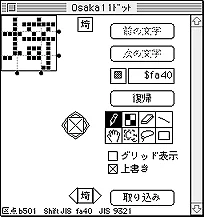
The GaijiEditor editing screen
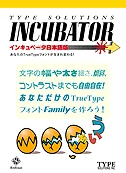
INCUBATOR Japanese Edition 1.2.2 is a tool for creating TrueType fonts in your own preferred style, based on existing TrueType fonts.
Version 1.2 users can update to 1.2.2. Update content: optimisation for the PowerPC 604.
Download the free 1.2 → 1.2.2 updater (315 KB)
- Four adjustable parameters: colour (weight), character width, contrast, and slant
- Save the settings of fonts you create as files
- Use metrics files made in other environments to create fonts with identical metrics
- Use metrics files to open documents created in other environments without breaking their layout
Ryumin Light-KL and Chu Gothic BBB are not supported because they use a different font format.
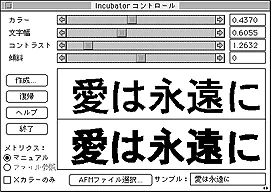
The INCUBATOR editing screen
A tool for creating and modifying “Marukan files”, which are bitmap fonts. – Create new Marukan files or modify existing ones – Import bitmaps from existing Marukan fonts – Edit bitmaps with tools such as pencil, line, and lasso – Create three types of Marukan file (fdef 0, 2, and 7)
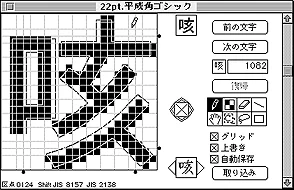
The Marukan Editor editing screen
Products — Tools
(Page 2 of the product pages: previous / 1 / 2 / 3 / 4 / next)
Tools
Kanji Edit Kit 2.5
Requirements: This product does not support Mac OS X. Macintosh running KanjiTalk 7.6.1 to Mac OS 9.2.2, with a CD-ROM drive.
Features: Create your own original Japanese TrueType fonts, for both Mac OS and Windows.
More details
GAIJI TOOLS
Requirements: This product does not support Mac OS X. Macintosh running KanjiTalk 7.6.1 to Mac OS 9.2.2, with a CD-ROM drive.
Features: Create and register gaiji in 1-byte or 2-byte PostScript or ATM fonts (2-byte gaiji registration uses Adobe Type Composer). Import outline artwork made in Adobe Illustrator and convert and register it as a gaiji font.
More details
Gallery
Original artwork and samples


Related typography
Explore related products

Enfour Gaiji DX
Enfour Gaiji DX (1998) added about 1,500 gaiji to Mac OS and Morisawa DTP fonts, in i, TrueType, ATM, and PS editions plus option packs.
FONT1000
FONT1000 was a project of 25 Japanese type designers who made and sold their own fonts with Enfour’s Kanji Edit Kit, released July 2001.

Gaiji & Kanji Edit Kits
A showcase of Japanese typefaces built with Enfour’s Kanji Edit Kit, from ZEN Old Mincho to seal-script and brush fonts by independent makers.