
Skip to content

Gaiji & Kanji Edit Kits

Kanji Edit Kit 2.5

Kanji Edit Kit 2.5 turned Fontographer fonts or Illustrator outlines into 2-byte Japanese TrueType fonts for Mac OS and Windows.
At a glance

Kanji Edit Kit is Enfour’s tool for creating original Japanese TrueType fonts for Mac OS and Windows. It converts 1-byte fonts made in Macromedia Fontographer into 2-byte Japanese fonts and turns Adobe Illustrator outline data into font glyphs. Version 2.0 added Windows TrueType export, and on 20 April 2001 it became Kanji Edit Kit 2.5. Professionals and independent designers, including the FONT1000 project, used it to publish their own typefaces.

Key facts

Latest version2.5 (from 20 April 2001)
OutputJapanese TrueType for Mac OS and Windows
InputFontographer 1-byte fonts, Illustrator outlines
Used byFONT1000 designers and independent foundries
StatusHistorical product
Kanji Edit Kit 2.5: Kanji EK25 cap (original Enfour artwork)
Part of

Enfour’s font-creation tools: Kanji Edit Kit, GAIJI TOOLS, and the Gaiji Edit Kit family for making original Japanese fonts and gaiji.

Historical product information from Enfour’s original Japanese font site, translated into English. Prices, addresses, and ordering details from the period are omitted.

Details

From the original product pages

Kanji Edit Kit

Kanji Edit Kit title

↓

On April 20, 2001, Kanji Edit Kit 2.0 became Kanji Edit Kit 2.5.

You will be taken to the Kanji Edit Kit 2.5 page in 5 seconds.
Kanji Edit Kit 2.5

Kanji Edit Kit 2.5: Kanji EK25 logo (original Enfour artwork)

Japanese TrueType font creation tool

Kanji Edit Kit 2.5: Kanji EK25 cap (original Enfour artwork)

A 2-byte font editing tool for creating original Japanese TrueType fonts for Mac OS and Windows

Features

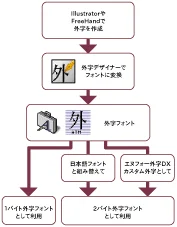
Create original Japanese TrueType fonts for Mac OS and Windows. Turn 1-byte fonts made in Fontographer into 2-byte fonts, or turn Illustrator outline data into fonts. Generate full fonts with Latin characters, kana, and kanji, as well as 2-byte kana fonts, fonts with original gaiji, and gaiji fonts for Windows (EUDC). PDF embedding can be enabled. Fonts you create can be sold and distributed royalty-free under set conditions.

Overview

Three tools — Kanji Designer, Roll-Up Tool, and BASS-Packer — let you create original Japanese TrueType fonts.

Kanji Designer — a glyph editor for creating 1-byte TrueType fonts. Converts EPS data made in Illustrator into (1-byte) TrueType fonts.

Roll-Up Tool — rolls 1-byte TrueType fonts up into what is called BASS data.

BASS-Packer — generates Japanese TrueType fonts for Mac OS and Windows from BASS data. You can set font information such as the font name, typeface name, and copyright information.

In detail

How Japanese fonts are structured, and Kanji Edit Kit

A Japanese font’s character set is built on about 7,000 characters: proportional and fixed-width alphanumerics, JIS symbols, hiragana, katakana, and JIS Level 1 and Level 2 kanji. Adding system gaiji (Apple standard system gaiji or NEC gaiji), IBM extended characters, and NEC-selected IBM extended characters completes the standard character set for each OS. Some fonts also add their own characters (so-called user gaiji) in unused (undefined) code areas.

Kanji Edit Kit divides this large character set into 1-byte TrueType fonts of 94 characters per JIS row or 188 characters per Shift_JIS row (called slot data in Kanji Edit Kit), and finally assembles them into a single Japanese font.

You can build a full set equivalent to a commercial font, or a font of just kana or just gaiji. Design all the alphanumerics at a fixed width and you can make a monospaced font.

How production works

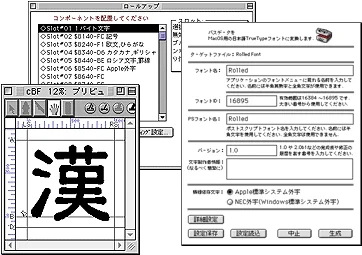
Font creation with Kanji Edit Kit is done on the Macintosh. Kanji Edit Kit includes a glyph editor called Kanji Designer. You can draw glyphs in it, or import EPS files made in the Illustrator you already know. And because slot data are 1-byte TrueType fonts, you can also use 1-byte font tools such as Fontographer, the well-known Latin font editor.

Once the slot data you need are ready, roll them up with Roll-Up Tool into BASS data — think of it as a bundle of glyph data. BASS data does not work as a font yet: BASS-Packer adds the information a font needs and finishes it as a TrueType font for Mac OS or Windows. BASS-Packer sets the font name, font information, PDF embedding settings, and more.

Platform-dependent characters

Japanese TrueType fonts for Mac OS and Windows usually differ in part of their character sets. These “platform-dependent characters” cause garbled text. Mac OS TrueType fonts normally use Apple standard system gaiji, but you can make them NEC gaiji, as on Windows. They normally lack IBM extended characters, but you can include them.

By making the platform-dependent parts identical on both OSes, Kanji Edit Kit lets you create Japanese fonts with the same character set. However, depending on the specifications of each OS, printer driver, application, and input method, results may not be completely identical. Also, the area assigned to NEC-selected IBM extended characters (the same as the IBM extended characters) on Windows cannot be used on Mac OS, so this part cannot be made identical.

Selling and distributing original fonts

You may sell or distribute the original fonts you create, royalty-free, provided you agree to the conditions.

Conditions Font data created with Kanji Edit Kit carries the information “Generated by Kanji Edit Kit 2.5.” When selling or distributing, please state in a ReadMe file or similar that the font was created with Kanji Edit Kit. If you wish these conditions to be waived, please contact us.

A request When you start selling or distributing, please let us know — an email is fine. We may introduce your font on our website, and it helps us develop and provide better font tools. We would also appreciate a link to our website.

Package contents

CD-ROM: – Kanji Designer 1.0.1 – Kanji design sheet – ART2EPS1 2.0.1 – Templates for Kanji Designer (JIS / Shift_JIS) – Templates for Fontographer (JIS / Shift_JIS) – Roll-Up Tool Mac 1.53 J – BASS-Packer 2.5 – Character code list (Shift_JIS) – UniDict Lite for Kanji – Type 1 plug-in – Font creation manual – Slot character code table

Requirements

  • Macintosh or Power Macintosh running KanjiTalk 7.1 to Mac OS 9.2.2
  • 8 MB or more memory
  • About 20 MB free disk space

TrueType fonts created with this product can be used on Mac OS X, but depending on the specifications of applications such as word processors and graphics software, platform-dependent characters, and gaiji in the fonts may not display correctly.

For upgrades from Kanji Edit Kit 1.0/2.0, see here. Fontographer users, see here.
Notes

  • There is no function for importing existing fonts.
  • There are no hinting or bitmap functions.
  • Characters assigned to undefined areas may not be usable.
  • Kanji Designer may not handle fonts with very complex designs.
  • Glyph designs may be distorted when converting from Type 1 to TrueType.
  • TrueType fonts created with this product can be used on Mac OS X, but depending on application specifications, platform-dependent characters, and gaiji may not display correctly.
  • Product specifications and prices are subject to change without notice.

Kanji Edit Kit 2.5 Upgrade

Kanji Edit Kit 2.5 Upgrade

Main improvements from 2.0 to 2.5

Easier slot creation – The Kanji Design Sheet makes the virtual body easier to work with. – ART2EPS1 v2.0 makes it easy to adjust where EPS files are placed in Kanji Designer. – The manual now explains how to create slots in Fontographer.

Support for changes in the OS environment – Fixed unintended characters appearing in blank characters on Mac OS 8.6 and later. – Fixed problems that occurred when no space character was defined. – Fixed extra letter spacing in Microsoft Word on Windows.

Customizable platform-specific characters – Choose Apple standard or NEC characters for the system gaiji area. – Supports IBM extended characters and NEC-selected IBM extended characters (IBM extended characters only on Mac). – Finer control over undefined code areas.

More settings – Space characters can be set freely. – Monospaced fonts can be set. – Log data for checking problem glyphs can be saved. – BASS-Packer settings can be saved and loaded.

The main improvement from 1.0 to 2.0 and later was support for exporting Japanese TrueType fonts for Windows.

Selling and distributing fonts made with Kanji Edit Kit 2.5

As before, original fonts you create can be sold or distributed royalty-free, but the conditions have changed slightly. Please note the following.

Condition: When selling or distributing a font, state in its ReadMe file or similar that it was created with Kanji Edit Kit. If you wish to have this condition waived, please talk to us.

Request: Please let us know (an email is fine) when you start selling or distributing a font. We may feature it on our website, and it helps us develop and provide better font tools. We would also appreciate a link to our website.

Eligible users

Registered users of Kanji Edit Kit 1.0 and 2.0 as of March 9, 2001.

Upgrade prices

Free upgrade for: – Users who bought a package with a free-upgrade sticker – Users who bought the product in January 2001 or later (please show a receipt or other proof of purchase date)

How to apply

Payment

Shipping

Shipping begins April 16, 2001; orders ship about one week after application.

Special Offer for Fontographer Users

Special offer for Fontographer users

Kanji Edit Kit can also create Japanese TrueType fonts from TrueType fonts made with Macromedia Fontographer.

Working together with Kanji Edit Kit, gaiji fonts, kana fonts, and other fonts you have been making in English font format can be turned into Japanese TrueType fonts.

Eligibility: Macromedia Fontographer users

  • the special-offer application form
  • your Fontographer serial number, or a copy of the face of the CD-ROM (to confirm that you are a registered Fontographer user)

Shipping: We ship about one week after receiving your application. Please contact us if you need it sooner.

Note: Fontographer is not included in this offer.

Enfour FONT TOOLS WEB

Enfour FONT TOOLS WEB

Enfour products

Kanji Edit Kit (Mac) — Make your own Japanese fonts A toolset for creating original Japanese TrueType fonts for Mac OS and Windows. You can also make use of data from 1-byte font editors such as Fontographer, and from Illustrator.

Resorcerer 2.4.1J (Mac) — Editing font files (finishing and analysis) Resorcerer is a powerful resource editor. It is not a font tool as such, but it is a well-respected development tool for Mac software, and because it can edit large resources and data forks it is also very effective for font development. (As a development tool, it requires technical knowledge.)

Download corner

The following software is free to use if you agree to the Software Licence.

Software Description
SuitToDfont v0.9d1 Converts suitcase-format font files into “.dfont” font files. An app for the native Mac OS X environment only.
DfontToSuit v0.9d1 Converts “.dfont” font files into suitcase-format font files. An app for the native Mac OS X environment only.

[Software Licence] (click here)

FontLab products

We previously acted as an import sales agent for FontLab products, but we have since stopped handling them. Please buy FontLab products directly from the online store on the FontLab website.

FontLab website: http://www.fontlab.com

Related typography

Explore related products

Fonts Made with Kanji Edit Kit: KEK 2x 2 (original Enfour artwork)
Gaiji & Kanji Edit Kits

A showcase of Japanese typefaces built with Enfour’s Kanji Edit Kit, from ZEN Old Mincho to seal-script and brush fonts by independent makers.

FONT1000

FONT1000 was a project of 25 Japanese type designers who made and sold their own fonts with Enfour’s Kanji Edit Kit, released July 2001.

GAIJI TOOLS: flow (original Enfour artwork)
Gaiji & Kanji Edit Kits

GAIJI TOOLS let DTP users create gaiji for any PostScript typeface and embed them in PDF, and succeeded Gaiji Edit Kit in 2000.