Skip to content

Enfour Gaiji DX

Enfour Gaiji DX ATM Edition

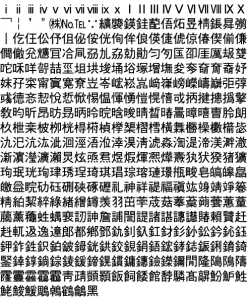
Gaiji DX ATM Edition added about 1,500 gaiji to Morisawa Ryumin L-KL and Chu Gothic BBB, or Futo Min, Futo Go, and Jun, for professional Mac DTP.


At a glance

Enfour Gaiji DX ATM Edition brings about 1,500 gaiji to the standard Morisawa DTP fonts used with Adobe Type Manager. The 2-Typeface Pack matches L Ryumin L-KL and M Chu Gothic BBB, and the 3-Typeface Pack matches Futo Min, Futo Go, and Jun. It made the Apple standard system gaiji available too, and suited professional graphics and page-layout work.

Key facts

CharactersAbout 1,500 per typeface
Packs2-Typeface (Ryumin L-KL, Chu Gothic BBB); 3-Typeface (Futo Min, Futo Go, Jun)
FormatATM (Adobe Type Manager)
StatusHistorical product
DX-ATM image
Part of

Enfour Gaiji DX: the Macintosh gaiji font series that added about 1,500 extra Japanese characters to standard Mac OS and DTP fonts.

Historical product information from Enfour’s original Japanese font site, translated into English. Prices, addresses, and ordering details from the period are omitted.

Details

From the original product pages

Enfour Gaiji DX — ATM Edition

Enfour Gaiji DX Series: dx title (original Enfour artwork)

ATM Edition 2-Typeface Pack

  • Designed to match the ATM fonts Morisawa’s L Ryumin L-KL and M Chu Gothic BBB
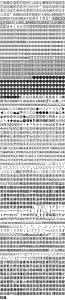
  • About 1,500 characters, including decorated numerals, symbols, and kanji for personal and place names
  • Easy input, with dictionaries for Kotoeri and other input methods
  • Includes special dictionaries, such as a medical dictionary of about 20,000 words
  • Create your own gaiji with Gaiji Edit Kit (sold separately)
  • Also supports Apple standard system gaiji
DX-ATM image

Product features

Enfour Gaiji DX ATM Edition 2-Typeface Pack makes about 1,500 gaiji available for each of Morisawa’s L Ryumin L-KL and M Chu Gothic BBB. These ATM fonts are widely used in DTP. The character set also supports Apple standard system gaiji. Just register the included Enfour Gaiji DX dictionaries (provided for Kotoeri and other input methods), and you can type gaiji through kanji conversion like any ordinary Japanese font.

Add the Medical, Dental, and IBM option packs (sold separately) for even more characters, or create original gaiji with Gaiji Edit Kit (sold separately).
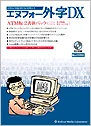
Enfour Gaiji DX ATM Edition: mdx ATM2 (original Enfour artwork)

Enfour Gaiji DX ATM Edition 2-Typeface Pack

Contents CD-ROM / installer floppy disk / comprehensive code chart / installation manual
Requirements KanjiTalk 7.1 or later (including Mac OS 8); 8 MB or more memory; 1 MB free disk space per typeface; CD-ROM drive; 2HD floppy drive; ATM 3.9.1 or later / Morisawa ATM fonts
Dictionaries Kotoeri, Kotoeri 2.0 / ATOK8, 11 / EG Bridge 7, 8, 9 / VJE-Delta; special dictionaries (personal and place names / medical terms / dental terms / Kampo terms / Okinawa dictionary); dictionary-registration text for other input methods (Kotoeri format)
Code range Shift_JIS F040–F7FC
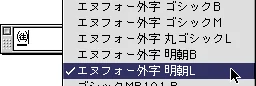
Typeface names Enfour Gaiji Mincho L (with L Ryumin L-KL); Enfour Gaiji Gothic M (with M Chu Gothic BBB)
Notes
  • Requires Morisawa’s ATM font package for L Ryumin L-KL and M Chu Gothic BBB.
  • The base fonts are outline-protected, so they cannot be converted to outlines.
  • This product cannot create gaiji. To create gaiji, use it with Gaiji Edit Kit (sold separately).
  • The typeface names in the font menu are Enfour Gaiji DX’s own names.
  • Gaiji cannot be used in JustSystems’ Ichitaro, which restricts use of the gaiji area.
  • With ATOK11, part of the gaiji area cannot be registered in the dictionary unless the Text Encoding Converter extension is version 1.3 or later.
  • “Download fonts” cannot be used when printing from Adobe Illustrator to a PostScript printer.
  • In Adobe Illustrator 7.0J, the base Morisawa font must be a CID font. Outlining the gaiji, using option packs and using data created with Gaiji Edit Kit are also not possible. (Version 5.5 does not have this problem.)
  • If you use Adobe Illustrator with a PostScript printer, we recommend Enfour Gaiji DX PS Edition (with ATM Edition).

Enfour Gaiji DX Series: dx title (original Enfour artwork)

ATM Edition 3-Typeface Pack

  • Designed to match the ATM fonts Morisawa’s Futo Min A101, Futo Go B101, and Jun 101
  • About 1,500 characters, including decorated numerals, symbols, and kanji for personal and place names
  • Easy input, with dictionaries for Kotoeri and other input methods
  • Includes special dictionaries, such as a medical dictionary of about 20,000 words
  • Create your own gaiji with Gaiji Edit Kit (sold separately)
  • Also supports Apple standard system gaiji
DX-ATM image

Product features

Enfour Gaiji DX ATM Edition 3-Typeface Pack makes about 1,500 gaiji available for each of Morisawa’s Futo Min A101, Futo Go B101, and Jun 101. These ATM fonts are widely used in DTP. The character set also supports Apple standard system gaiji. Just register the included Enfour Gaiji DX dictionaries (provided for Kotoeri and other input methods), and you can type gaiji through kanji conversion like any ordinary Japanese font.

You can also create original gaiji with Gaiji Edit Kit (sold separately).
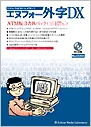
Enfour Gaiji DX ATM Edition: mdx ATM3 (original Enfour artwork)

Enfour Gaiji DX ATM Edition 3-Typeface Pack

Contents CD-ROM / installer floppy disk / comprehensive code chart / installation manual
Requirements KanjiTalk 7.1 or later (including Mac OS 8); 8 MB or more memory; 1 MB free disk space per typeface; CD-ROM drive; 2HD floppy drive; ATM 3.9.1 or later / Morisawa ATM fonts
Dictionaries Kotoeri, Kotoeri 2.0 / ATOK8, 11 / EG Bridge 7, 8, 9 / VJE-Delta; special dictionaries (personal and place names / medical terms / dental terms / Kampo terms / Okinawa dictionary); dictionary-registration text for other input methods (Kotoeri format)
Code range Shift_JIS F040–F7FC
Typeface names Enfour Gaiji Mincho B (with Futo Min A101); Enfour Gaiji Gothic B (with Futo Go B101); Enfour Gaiji Maru Gothic L (with Jun 101)
Notes
  • Requires Morisawa’s ATM font package for Futo Min A101, Futo Go B101, and Jun 101.
  • The base fonts are outline-protected, so they cannot be converted to outlines.
  • This product cannot create gaiji. To create gaiji, use it with Gaiji Edit Kit (sold separately).
  • The typeface names in the font menu are Enfour Gaiji DX’s own names.
  • Gaiji cannot be used in JustSystems’ Ichitaro, which restricts use of the gaiji area.
  • With ATOK11, part of the gaiji area cannot be registered in the dictionary unless the Text Encoding Converter extension is version 1.3 or later.
  • “Download fonts” cannot be used when printing from Adobe Illustrator to a PostScript printer.
  • In Adobe Illustrator 7.0J, the base Morisawa font must be a CID font. Outlining the gaiji and using data created with Gaiji Edit Kit are also not possible. (Version 5.5 does not have this problem.)
  • If you use Adobe Illustrator with a PostScript printer, we recommend Enfour Gaiji DX PS Edition (with ATM Edition).
  • Option packs are not sold for the 3-typeface pack.
Back to Enfour Gaiji DX
Related typography

Explore related products

DX-PS image
Enfour Gaiji DX

Gaiji DX PS Edition put about 1,500 gaiji on PostScript printers with no resolution limit, in OCF and CID, bundled with the ATM Edition.
DX-TT image
Enfour Gaiji DX

The Gaiji DX TrueType Edition 2-Typeface Pack added about 1,500 gaiji to Ryumin Light-KL and Chu Gothic BBB and supported the Medical and Dental packs.

Mac OS 8.5–9 Compatibility and Output Devices: IMfontname (original Enfour artwork)
Technical & Support Archive

Compatibility of Enfour gaiji, TypeBank, and kana fonts with Mac OS 8.5, 8.6 and 9, ATM requirements, and supported PostScript output devices.