
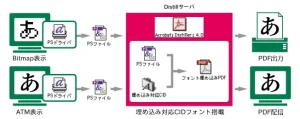
PDF/CID Laboratory: Embedding Japanese Fonts in PDF
Enfour's 1999 PDF/CID notes on embedding Japanese CID fonts in PDF with Acrobat 4.0, and its 117 embeddable typefaces.

Technical & Support Archive
Compatibility of Enfour gaiji, TypeBank, and kana fonts with Mac OS 8.5, 8.6 and 9, ATM requirements, and supported PostScript output devices.

| Product | 8.5 | 8.6 | 9 | Notes |
|---|---|---|---|---|
| Gaiji DX TrueType edition | ○ | ○ | ○ | About gaiji products on Mac OS 8.5 and later |
| Gaiji DX ATM edition | ○ | ○ | ○ | About gaiji products on Mac OS 8.5 and later; Mac OS 9 requires ATM 4.5.2 or later |
| Gaiji DX PS edition | ○ | ○ | ○ | |
| Gaiji DX i Edition | ○ | ○ | ○ | |
| Gaiji Kit Series | × | × | × | Switching to Gaiji DX |
| Gaiji Edit Kit (creating gaiji for Gaiji DX) | ○ | ○ | ○ | Bitmap fonts cannot be used on Mac OS 8.5 and later, so a base ATM font is required; use with ATM’s “Smooth font edges on screen” setting on. (Not needed for the TrueType edition.) |
| Gaiji Edit Kit (creating gaiji for Adobe Type Composer) | ○ | ○ | △ | On Mac OS 9, Adobe Type Composer 1.1 cannot create recomposite fonts. Recomposite fonts created on Mac OS 8.6 or earlier can still be used. (As of 11/30/99) |
| Kanji Edit Kit | ○ | ○ | ○ | |
| Shintaro Ajioka Kana | ○ | ○ | ○ | Mac OS 9 requires ATM 4.5.2 or later; use with ATM’s “Smooth font edges on screen” on |
| Typos Allmighty | ○ | ○ | ○ | Mac OS 9 requires ATM 4.5.2 or later |
| INCUBATOR | ○ | ○ | ○ | (Does not support the system’s standard TrueType fonts) |
| PS Error Handler | ○ | ○ | ○ | |
| UniDict | ○ | ○ | ○ |
○ Supported · △ Limited · × Not supported
As of November 30, 1999. This information is updated as needed.
In Mac OS 8.5J and later, each font format is handled as follows.
TrueType: Mac OS now includes ATSUI (Apple Type Services for Unicode Imaging), and ATSUI directly handles both the outlines and the bitmaps inside a TrueType suitcase. As a result, TrueType sbit Marukan files are no longer needed at all, and TrueType has become a simple single suitcase. TrueType fonts can also now support the features ATSUI provides.
For TrueType fonts with fbit Marukan files, the bitmaps in the Marukan file are automatically converted and moved into the suitcase when Mac OS starts up. Even if the conversion fails for some reason, the font should still work fine as a TrueType font without bitmaps, so there is no need to worry.
Type 1 / sfntCID: As before, ATM (Adobe Type Manager) handles the outlines and Mac OS handles the bitmaps. However, the bitmaps are handled not by Mac OS + ATSUI but by WorldScript II, which has absorbed the “Marukan Support” extension that used to handle Marukan files. (ATSUI support seems to be a little further off.) The file structure therefore stays as before — one suitcase and one sbit Marukan file. Do not delete the sbit Marukan file.
Type 1 / OCF and NakedCID: Mac OS 8.5 was originally going to convert the outlines and bitmaps of every font to sfnt, store them in suitcases and have the OS handle them directly. This raised concerns that OCF and NakedCID fonts, which are not sfnt-based, would stop working, but they can still be used as before. Outline and bitmap handling is the same as for sfntCID. OCF and NakedCID fonts come with fbit Marukan files. The OS automatically converts TrueType fbit Marukan files, but not Type 1 fbit Marukan files, so the file structure stays the same.
Bitmap fonts: Mac OS 8.5 had a problem displaying bitmap-only fonts with no outline information; updating Mac OS 8.5 to 8.5.1 fixes it. However, bitmap-only fonts must be placed in the Fonts folder inside the System Folder; they cannot be placed in another folder and managed with ATM Deluxe. (As of January 1999)
Summary – TrueType automatically moves to the latest handling. – Type 1 fonts are supported in almost the same way as before. – From the user’s point of view, existing font assets carry over without having to do anything.
This describes how Mac OS 8.5 handles fonts in general, not only our products; there are some exceptions.
Enfour Gaiji DX can be used on Mac OS 8.5 to Mac OS 9, with the following current restrictions. (The TrueType edition and i Edition are supported up to Mac OS 9.0.3, except under certain conditions.)
(ATOK12 to 14 can display gaiji. See here for details.)
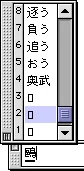
→ This part of the display is drawn with the Osaka font. Enfour Gaiji DX used “Enfour Gaiji Osaka Marukan (Basic)” to add gaiji to the Osaka font, but because of specification changes this method can no longer be used on Mac OS 8.5 to Mac OS 9.
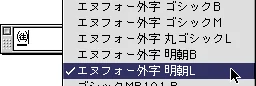
Workaround: Switch the input method’s display font to an Enfour Gaiji typeface name, such as “Enfour Gaiji Mincho L”. Note that the conversion candidates still cannot be displayed.
On Mac OS 8.5 to Mac OS 9, the bitmap data in the TrueType edition’s Marukan file is automatically converted to the latest font format and moved into the suitcase. On Mac OS 8.5, however, the conversion of “Enfour Gaiji Gothic M” stops partway and is not completed correctly.
Workaround: After installing the Enfour Gaiji TrueType 2-typeface pack: 1. Rename the suitcase file “Enfour Gaiji Gothic M” in the Fonts folder inside the System Folder to “Enfour Gaiji GM”. 2. Restart your Macintosh. The automatic update runs once at the end of start-up. 3. Once the Macintosh has started, rename “Enfour Gaiji GM” in the Fonts folder back to “Enfour Gaiji Gothic M”.
The Enfour Gaiji DX TrueType edition and i Edition require the TrueType fonts Ryumin Light-KL and Chu Gothic BBB. These two fonts were bundled with Mac OS 9.0.3 and earlier but are no longer bundled from Mac OS 9.0.4. The TrueType edition and i Edition are therefore supported up to Mac OS 9.0.3. As an exception, if a Mac OS 9.0.3 or earlier system with Ryumin Light-KL and Chu Gothic BBB already installed is upgraded to Mac OS 9.0.4–9.2.2 using a system updater, the requirements are met and the TrueType edition and i Edition can be used.
For kanji conversion input from Kotoeri, the candidate-palette problem described above occurs. The basic Enfour Gaiji characters can be entered from the Shift_JIS code table in the character palette, but option-pack gaiji and user-created gaiji cannot be entered from the code table either.
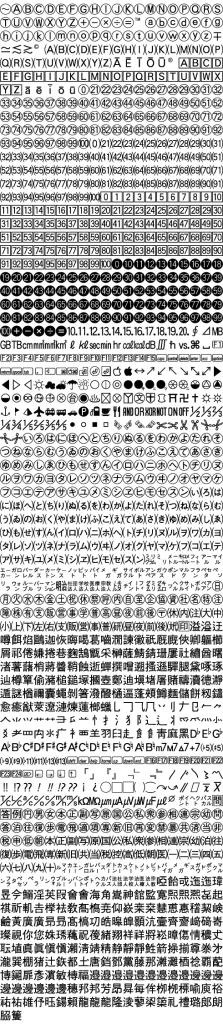
For input, please use a third-party kanji conversion program such as ATOK, or copy and paste gaiji from the gaiji list text file in the “Display and Print Check Documents” supplied with Enfour Gaiji DX. (In i Edition you can also use the “Gaiji Search Palette”.)
For kanji conversion input from Kotoeri, the candidate-palette problem described above occurs. In addition, on Mac OS 9.x the Enfour Gaiji DX fonts do not appear in the font menu of Kotoeri’s character palette, so they cannot be entered from the code table either.
For input, please use a third-party kanji conversion program such as ATOK, or copy and paste gaiji from the gaiji list text file in the “Display and Print Check Documents” supplied with Enfour Gaiji DX.
Enfour's 1999 PDF/CID notes on embedding Japanese CID fonts in PDF with Acrobat 4.0, and its 117 embeddable typefaces.
Archive of Enfour's Gaiji Download Service for Gaiji DX and GAIJI TOOLS users: radical index, character lists, and Weekly Gaiji Download issues.
Archive of Enfour's CID Variant Switching Download Service for TypeBank and GAIJI TOOLS users, merged into one radical index table.
How Enfour Gaiji DX worked with ATOK12–14, Kotoeri, and other input methods, including the gaiji dictionary files and IM Display font.
Enfour's free Marukan Compatible Vertical Writing Support file fixed garbled vertical text with Gaiji DX on Mac OS 8.5 and 8.6.
Archive of Enfour FONT TOOLS WEB free software downloads and the licence terms that applied to them.

News and events from Enfour's font business, 1999–2010: product launches, MACWORLD Expo/Tokyo 2000, and product updates.