
Mac OS 8.5–9 Compatibility and Output Devices
Compatibility of Enfour gaiji, TypeBank, and kana fonts with Mac OS 8.5, 8.6 and 9, ATM requirements, and supported PostScript output devices.

Technical & Support Archive
Enfour's 1999 PDF/CID notes on embedding Japanese CID fonts in PDF with Acrobat 4.0, and its 117 embeddable typefaces.
PDFs with embedded fonts: – Shintaro Ajioka Kana Series (472 KB) – Typos Allmighty (403 KB) – Kanji Edit Kit (357 KB)
These files were created with Adobe Acrobat 4.0 Japanese. PDF 1.3 files created with Acrobat 4.0 may not open in Acrobat Reader 3.0J, so please download Acrobat Reader 4.0 to view them. Click the “Get Acrobat Reader” banner to go to the download site.

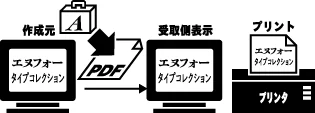
With font embedding in Adobe Acrobat 4.0J, a PDF displays and prints with exactly the same design even if the recipient does not have the same fonts. It is also unaffected by the application or OS environment.
Japanese font embedding became possible with Adobe Acrobat 4.0 English. Adobe Acrobat 4.0 Japanese was released on June 18, 1999, and is on sale now (see Adobe Systems’ website for details).
On both Macintosh and Windows, CID fonts and TrueType fonts can be embedded (OCF cannot). Embedding is basically done with Acrobat Distiller, but Macintosh TrueType fonts are embedded in Acrobat (as of August 1999). In both cases, only fonts flagged as permitting embedding can be embedded.
Yes — when creating recomposite fonts with Adobe Type Composer (ATC), as long as every font used supports embedding. (The ENFOUR TYPE COLLECTION manual says recomposite fonts cannot be embedded; this was incorrect, and we apologise for the error.)
ATC is said not to work on Mac OS 8.5, but apart from not being able to recomposite Latin characters, there is no problem. You can also use recomposite fonts created on Mac OS 8.1 or earlier.
When creating Japanese TrueType fonts with Kanji Edit Kit 2.0, you can set whether the font may be embedded in PDF files, for both Macintosh and Windows TrueType.
To embed a TrueType font created with Kanji Edit Kit 2.0 in a PDF on the Macintosh: 1. Lay out your document with an embeddable TrueType font created with Kanji Edit Kit 2.0. 2. Convert the layout to PDF. 3. Open the converted file in Acrobat. 4. Select the TrueType text with the TouchUp tool. 5. From the Tools menu, open TouchUp > Text Attributes. 6. Check “Embed” to embed the font. 7. Save the PDF.
Text attributes can only be changed one line at a time with TouchUp, but if you select part of the text in the typeface you want to embed and check “Embed”, every part of the PDF set in that typeface is embedded. CID fonts that permit embedding can also be embedded this way.
Embedding subsets only the characters used in the document, so files are much smaller than when fonts are converted to outlines in Illustrator. And unlike outlined text, characters do not thicken when printed on low-to-mid-resolution printers.
Acrobat Reader 4.0 is required. Click the “Get Acrobat Reader” banner to go to the download site.
Display can be unstable depending on memory usage. Close other applications or restart, then view again. If it does not display properly in your browser, download the PDF first and then view it.
Yes — it displays and prints exactly the same on Windows. Windows users, please try it.
Here we consider the best way to manage fonts for PDF production, using Acrobat 4.0′s font embedding.
CID fonts cannot be embedded with PDFWriter or by exporting PDF directly from an application. To embed fonts in PDF, you must convert with Acrobat Distiller. So what does Distiller actually do?
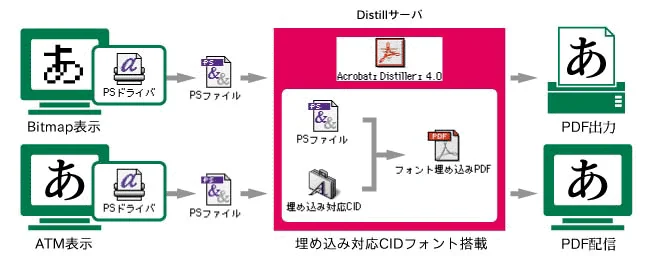
When a PDF file is created, the content on screen is converted to a PostScript file by the PostScript driver (LaserWriter, PSDriver, AdobePS, or similar, selected in the Chooser). Distiller then processes the PostScript file and converts it to PDF. A PostScript file is a PostScript script written in text form. While converting it to PDF, Distiller uses the font names to obtain the necessary font information from the CID fonts and embeds it.
This mechanism is almost the same as the way a PostScript printer rasterises the PostScript fonts on its hard disk. Distiller can therefore be seen as a software RIP that generates PDF — the PostScript engine of a printer or RIP, taken out on its own. From this point of view, CID ATM fonts play the role that printer fonts play for a PostScript printer.
In traditional DTP, you could display with bitmaps on the Mac and output via printer fonts installed on a PostScript printer. Applied to PDF, you could write PostScript files on a Mac with only bitmap fonts, then distill (convert to PDF) on a machine with embeddable ATM fonts installed.
At Enfour, we call a machine with embeddable ATM fonts installed for distilling a “Distill server”. We are preparing a product configuration ideal for this kind of font workflow.
Taking this idea further, it is clear you can also create PDFs with embedded fonts from layout data made with OCF fonts: write a PostScript file from the OCF data, then generate the PDF on a Distill server with embeddable CID fonts. In the same way, it should be possible to create data using Windows font-substitution settings, write a PostScript file, and distill it. This only works, however, when the PostScript names of the OCF and CID ATM fonts match.
The PDF survey has closed. Thank you very much to everyone who took part.
Please always link via http://www.enfour.co.jp/media/.
Compatibility of Enfour gaiji, TypeBank, and kana fonts with Mac OS 8.5, 8.6 and 9, ATM requirements, and supported PostScript output devices.
Archive of Enfour's Gaiji Download Service for Gaiji DX and GAIJI TOOLS users: radical index, character lists, and Weekly Gaiji Download issues.
Archive of Enfour's CID Variant Switching Download Service for TypeBank and GAIJI TOOLS users, merged into one radical index table.
How Enfour Gaiji DX worked with ATOK12–14, Kotoeri, and other input methods, including the gaiji dictionary files and IM Display font.
Enfour's free Marukan Compatible Vertical Writing Support file fixed garbled vertical text with Gaiji DX on Mac OS 8.5 and 8.6.
Archive of Enfour FONT TOOLS WEB free software downloads and the licence terms that applied to them.

News and events from Enfour's font business, 1999–2010: product launches, MACWORLD Expo/Tokyo 2000, and product updates.