
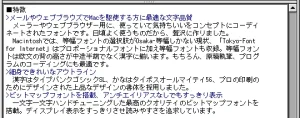
Tokyo-Font for Internet
Tokyo-Font for Internet (2002) paired TypeBank Gothic SL kanji with Typos 56 kana and hand-tuned bitmaps for crisp Mac email and web text.

Tokyo-Font & Keitai-Font
Keitai-Font (2001) was a TrueType font that displayed NTT DoCoMo i-mode emoji on Windows and Mac so web designers could build i-mode sites.
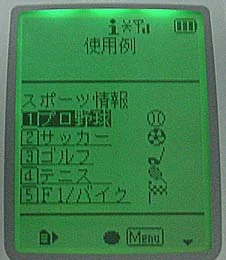
Keitai-Font is a Japanese TrueType font that displays i-mode emoji on Windows and Mac OS computers. It comes as a hybrid Windows/Macintosh font package. When you view i-mode sites that use emoji on a computer, they display correctly instead of as garbled characters, and you can also post emoji to message boards. When you create i-mode sites that use emoji on a computer, you can enter emoji while editing C-HTML by seeing the actual characters rather than tags. It looks like a bitmap font, but it is an outline font that draws the dots with straight lines, so it can be enlarged on screen and printed at any scale. As well as emoji, it includes alphanumerics, katakana, hiragana, and kanji (JIS Levels 1 and 2). The alphanumerics are monospaced so the display looks close to a real i-mode screen. Beyond web design, it is ideal for writing manuals for mobile handsets and electronic devices, and for artwork with a digital look.

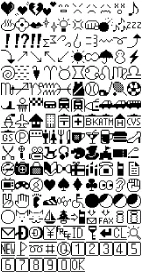
Keitai-Font contains the emoji at the codes in the i-mode emoji list, so each emoji can be written and displayed as a single (2-byte) character.
Package contents: CD-ROM, manual
Character set: JIS X 0208-1997; i-mode emoji (extended emoji added from the 504 series onwards are not included)
Requirements
Windows – PC/AT-compatible computer running Windows 95/98/98SE/Me/NT 4.0/2000/XP – CD-ROM drive – About 5 MB of free hard-disk space
Macintosh – Macintosh able to run KanjiTalk 7.6.1 to Mac OS 9.2.2 – CD-ROM drive – About 5 MB of free hard-disk space
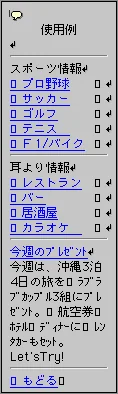
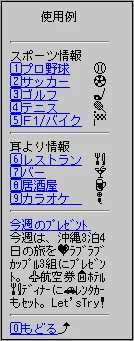
With Keitai-Font you can edit i-mode web pages in web-authoring software while checking the i-mode emoji on screen.
Left: a typical font. Right: Keitai-Font.
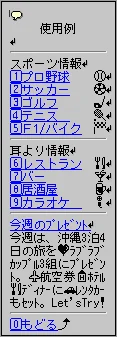
Of course, i-mode emoji also display in text editors.
Click the image above for a detailed view.
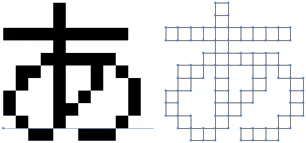
Convert to outlines in Adobe Illustrator and apply effects to get a wide range of results.
A. No — it is a font you install on your computer. Keitai-Font is a TrueType font for computers running Windows or Mac OS. If you want to use it on another OS or a dedicated system, please contact us.
Q. What are the benefits? A. You can display i-mode emoji on your computer. Normally, when you view i-mode sites or message boards that use emoji on a computer, the emoji appear as “□”. Set your browser’s display font to Keitai-Font and this garbling no longer happens. You can also create i-mode sites and post to message boards with the emoji displayed.
Q. Why don’t the characters get garbled? A. Because the font contains the emoji. Ordinary computer fonts do not contain emoji, but Keitai-Font does. The emoji are assigned to a fixed area of Shift_JIS codes, following the codes in the i-mode emoji list.
Q. Can I only type emoji? A. No. It also includes symbols, monospaced alphanumerics, kana, and kanji (up to JIS Level 2), so you can type text just as with an ordinary Japanese font.
Q. How do I enter emoji? A. By copy and paste or from the character palette. Copy and paste from the included emoji list text file, or double-click in the character palette (IME Pad). You can also register them in your dictionary as words.
Q. Can I convert it to outlines in Adobe Illustrator and similar tools? A. Yes. It looks like a bitmap font (designed as a collection of dots), but it is an outline font (designed with points and lines) that draws each dot with straight lines, so you can convert it to outlines in design tools such as Adobe Illustrator and then scale or transform it for many different effects.
Q. Can I distribute work made with Keitai-Font? A. Please ask us. Keitai-Font is licensed only for display and printing on individual computers. Use in video works, game software, and the like requires a separate agreement, so please contact us.
News release (December 25, 2000) · News release (September 3, 2001)
Bitmap typeface design
Enfour Media Laboratory — To the Enfour font products top page Founded in 1992, Enfour provides Japanese fonts, gaiji solutions, and font creation tools. In 1996 it helped establish the Recording Industry Association of Japan (RIAJ) standard for music gaiji, used in CD-Text, and MiniDisc. Besides tools and services for OS vendors and font makers, it also offers services for DVD, digital TV, and film subtitles.
December 25, 2000
Enfour Media Laboratory today announced that from February 20, 2001 it will sell Keitai-Font, a font that can display i-mode emoji.
Limited to 1,000 copies
February 20, 2001
CD-ROM, manual
JIS X 0208-1997; i-mode emoji
Windows: PC/AT-compatible running Windows 95/98/98 SE/Me/NT 4.0/2000; CD-ROM drive; about 5 MB free disk space Macintosh: A Macintosh that can run KanjiTalk 7.6.1 or later; CD-ROM drive; about 5 MB free disk space
Bitmap typeface design
Enfour Media Laboratory — Enfour Media Laboratory top page Founded in 1992, Enfour Media Laboratory provides Japanese fonts, gaiji solutions, and font creation tools. In 1996 it helped establish the Recording Industry Association of Japan’s standard Music Gaiji used for CD-Text and MiniDisc (MD). Beyond tools and services for OS vendors and font makers, it also provides services for DVD, digital TV, and film subtitling.
September 3, 2001
Enfour Media Laboratory announced that from September 14, 2001 it will re-release Keitai-Font, a font that can display i-mode emoji.
Keitai-Font is a font package first released in a limited edition on February 20, 2001. After the limited edition sold out, it will be re-released from September 14 in response to customer requests.
September 14, 2001
CD-ROM, manual
JIS X 0208-1997; i-mode emoji
Windows: PC/AT-compatible running Windows 95/98/98 SE/Me/NT 4.0/2000; CD-ROM drive; about 5 MB free disk space Macintosh: A Macintosh that can run KanjiTalk 7.6.1 or later; CD-ROM drive; about 5 MB free disk space
Bitmap typeface design
Enfour Media Laboratory — Enfour Media Laboratory top page Founded in 1992, Enfour Media Laboratory provides Japanese fonts, gaiji solutions, and font creation tools. In 1996 it helped establish the Recording Industry Association of Japan’s standard Music Gaiji used for CD-Text and MiniDisc (MD). Beyond tools and services for OS vendors and font makers, it also provides services for DVD, digital TV, and film subtitling.
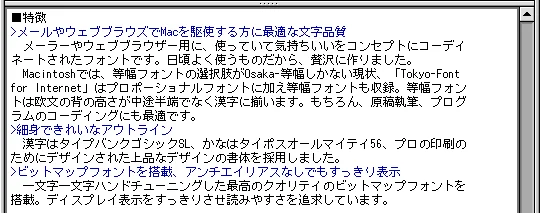
Tokyo-Font for Internet (2002) paired TypeBank Gothic SL kanji with Typos 56 kana and hand-tuned bitmaps for crisp Mac email and web text.